










Change Google Drive Share Permissions

Read summarized version with
Why do these settings matter?
Using Orangedox for Google Drive we require that users have the ability to share outside their organization. This ensures that we can deliver shared Google Drive files on the behalf of our users. If you don’t have this permission enabled you may have received this message while trying to securely share a file or create a new Data Room.
Where can you change these permissions?
First you’ll need to be the Google account administrator of this organization, or have the account administrator complete these steps.
Next you need to consider who needs these permissions. You can specify who can share externally by setting up organizational units within Google Workspace to control this access.
When you’re ready to modify access, browse to the Google Admin page https://admin.google.com
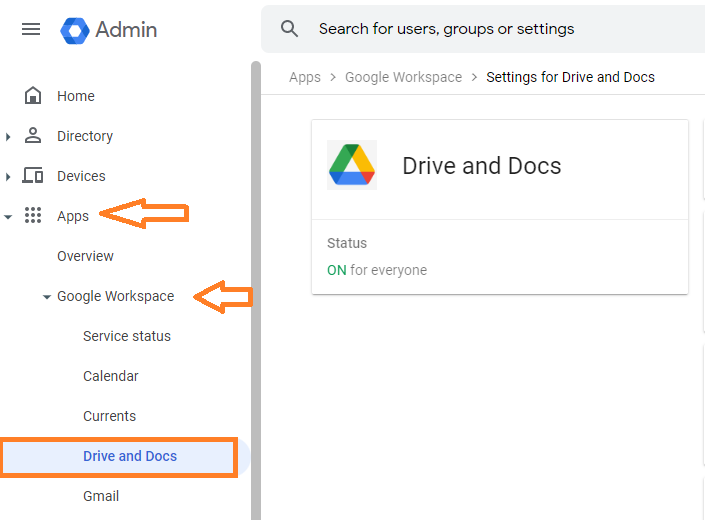
Select Apps > Google Workspace > Drive and Docs
from the left hand menu
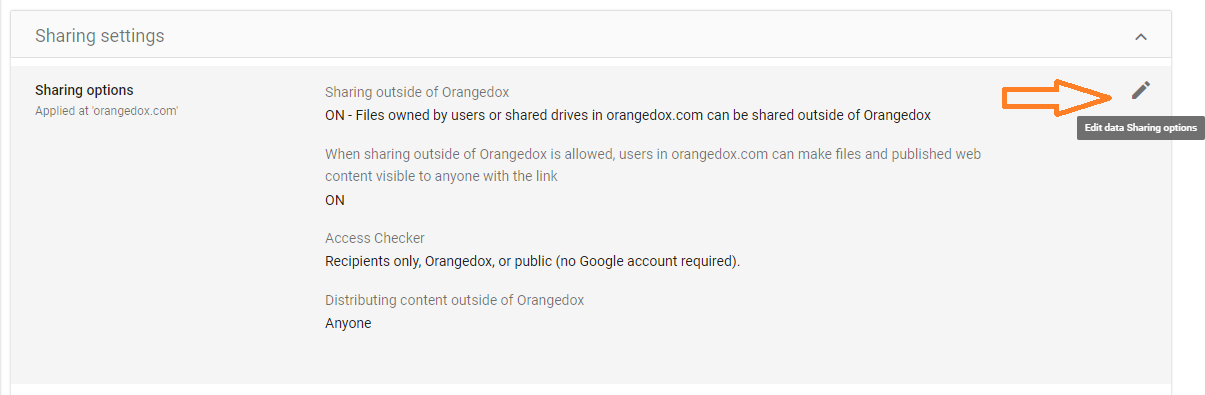
Expand Sharing Settings
Select the Edit Button for Sharing Options
Located in the upper right hand corner
What should you change?
Once you’ve located the sharing options for Google Drive you should be able to change the following options
There are multiple methods to sharing outside you organization; Orangedox requires that you set the ability to share using a link (the highlighted option in the screen capture above). This will allow anyone who has this to be able to view or download the file.
Once these settings are saved it may take upwards of 24 hours for Google Drive to recognize the changes.
Want more information?
For more information on Google Drive security check out the following help article on Google
https://support.google.com/a/answer/60781?hl=en
Keep Reading


